Video tutorials
Filters:



Physics in LEGO Mindstorms: Energy Accumulation and Conservation. Part 3 - angular velocity
We got the speed of rotations of the motor in Radians per second. Let's calculate the value for the speed of the whole system. We calculate that the wheels are rotating with 375 radians per second. Which is impressive and quite fast for this system. From this speed, knowing the inertia mass we can calculate how much energy is the system accumulating.
- #116
- 22 Nov 2015

FLL 2023: Pull - Chain Monster box robot accomplishing M09
In this video tutorial we demonstrate how to accomplish M09 of FIRST LEGO League 2023-2024 MASTERPIECE Challenge. The robot is Chain Monster - a LEGO Education SPIKE Prime robot. It pulls the mission model and precisely positions it in the designated area. An interesting aspect is that the robot must rotate to position the loop correctly, so pay close attention when programming it.
- #2350
- 18 Sep 2024

FLL 2022: Lift, Lever - How to accomplish M11 with Kriket Box Robot - FIRST LEGO League 2022-2023 SUPER POWERED
This video tutorials shows how we accomplish a specific mission model from FIRST LEGO League 2022-2023 SUPER POWERED robotics competition. The mission is called - M11 Hydroelectic Dam and in the tutorial we accomplish part of it. In other tutorials when we get back with the SPIKE Kriket box robot we have more time to accomplish the rest of the missions.
- #2258
- 19 Mar 2024

EV3 Phi. Turning. Intro to module and doing a competition
So far we know how to make a turn in an arc, just like the real cars do.
Today we will see what other options our robots have for turning.
- #414
- 18 Apr 2017


Using cables to connect the motors to the brick
We will learn how to connect and disconnect LEGO cables and on which ports exactly to connect the motors.
- #355
- 04 Feb 2017

EV3 brick menu - my projects
The most universal way to start your programs is from My Projects menu and we will cover details about that menu in the EV3 Brick.
- #353
- 04 Feb 2017

How to move in straight line with the Motion sensor from LEGO MINDSTORMS Robot Inventor
In this video tutorial we try to move forward with a LEGO Mindstorms Robot Inventor robot and we try to keep a straight line using the Motion Sensor. Without entering into the details of the programming we demonstrate what is the behavior of the robot when trying to keep a straight line with the Motion Sensor while we are participating in a FIRST LEGO League competition.
- #1867
- 24 Mar 2022

Arduino Basic Course. Write your first Arduino program. Use example programs
For making the diode blink we just use one of the examples available in the Arduino Software.
- #312
- 15 Nov 2016

How to use an Ultrasonic Sensor in EV3 retail version
There is no block for programming the Ultrasonic Sensor in the retail version of the LEGO Mindstorms EV3 software. In this video tutorial we will show you how you can download & import such blocks in order to use the sensor.
- #46
- 06 Nov 2013

10 runs on follow and align Color Sensors from LEGO Education SPIKE Prime
On of the most precise ways to position on the FIRST LEGO League and other competition fields is to follow and align and in this tutorial we demonstrate exactly this - how consistent and reliable this method is to reach specific mission models. In this way you know that every time you will be at the right place, which is great.
- #1944
- 10 Aug 2022

Advanced Light/Color sensors calibration for a maximum value for a single sensor
Following the Advance Light/Color sensors calibration for a minimum value for a single sensor tutorial, in this one, we continue with finding the maximum value detected by a sensor and storing this value in an array.
- #642
- 04 Oct 2017

Improving FLL Robot Game. Extend axles to reach from the motor to the wheels
Construct two legs for both sides of the robot. The task for this video is to attach this two legs on both sides and to build a system of gears and axles that power those legs.
- #460
- 28 Mar 2017

Physics in LEGO Mindstorms: Energy Accumulation and Conservation. Part 4 - experiment for energy in Joules
We dispay the speed of rotation of the wheels on the brick screen. We use the math blocks to do a proper calculations from rotation to radians per second. Knowing the speed, the radiuses and the mass of the wheels we find energy in Joules accumulated in the construction.
- #117
- 29 Nov 2015

What is an "Alternative model" and "Alternative mission"?
Once you get used to it, it's easy. We promise! Here is the deal - we need 'Alternative models' and 'Alternative missions' to facilitate learning in a team of students or when you can not build the specific mission models.
- #2169
- 02 May 2023

10 runs on improve accuracy by accelerating with LEGO Education SPIKE Prime
In this 10 out of 10 tutorial we demonstrate the accuracy of the robot when we use acceleration in its movements. The robot has not sensors attached to it and it is not making use of it's internal sensors. The goal of the tutorial is to give you the understanding and to make a demonstration of how difficult it is to consistently reach a mission model without the use of sensor even when we use acceleration.
- #1913
- 19 Jul 2022

Teacher's Note: Add a touch sensor without instructions
What is allowed and what is not when building without instructions.
- #432
- 03 May 2017

Display block in the EV3-G software. Smiley faces, angry faces... all kinds of emotions
This is how to use the display block to show images with the EV3 software.
- #390
- 22 Apr 2017

Have fun playing with the Remote Control Car before disassembling it
This is a remote control car. Have fun with it before disassembling it.
- #672
- 01 Feb 2018

Every program is comprised of a series of instructions
Let's make a program that moves the robot forward and then backward.
- #378
- 04 Feb 2017

Teacher Notes: Introduction to EV3 Controller
There are some things to be careful about when your students work with the brick.
- #351
- 24 Jan 2017

10 runs on simple line follow with Color Sensor from LEGO Education SPIKE Prime
With this 10 runs we demonstrate the consistency and reliability that could be achieved with a LEGO Education SPIKE Prime robot and a 2-states simple line following algorithm. It is not bad. Still there are some things you should consider when using this program and one of the things is the use of the timers
- #1934
- 29 Jun 2022

Task: make the robot greet a stranger and leave
Explanation and demonstration of the big task for the lesson.
- #394
- 26 Apr 2017

Arduino Basic Course. Programming your first device with a blinking diodе
Developing a program for the Arduino is very easy. We need to do again three thigs:
- #310
- 15 Nov 2016
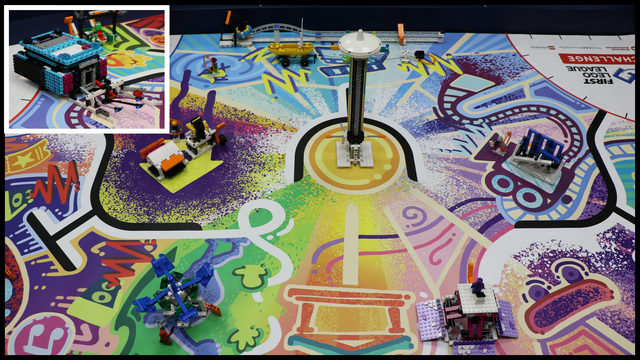
FLL 2023: Chain Monster accomplishing more than 92% of the missions (around 510 points) of the FIRST LEGO League 2023-2024 MASTERPIECE Challenge
In this video tutorial, we demonstrate a full run of all missions without pausing the recording. The competition is the FIRST LEGO League 2023-2024 MASTERPIECE Challenge, and the robot is the Chain Monster - a LEGO Education SPIKE Prime robot.
These kinds of runs are extremely useful for team preparation right before the competition, as they help team members improve their accuracy, speed, and self-control.
- #2365
- 02 Oct 2024

Improving FLL Robot Game. Teacher's Note. Correct solution on calculating gears.
This is a teacher's note about the math behind calculating gear ratios with for our lifting attachment. It math model we build in previous tutorials is not exactly correct and here is the explanation why.
- #474
- 11 Apr 2017