The robot is equipped with two motors, one on each side. As a result, whenever the robot turns, it always follows a curved path, also known as an arc. The size and radius of this arc depend on how the robot is programmed to turn.
To access the full video please subscribe to FLLCasts.com
- #1341
- 14 Jun 2019
Types of Turns
1. Smooth Turn
The robot makes a smooth turn by driving both wheels forward at different speeds.
A smooth turn is used when we want the robot to make a wide turn, allowing it to follow an arc or drive in a circle. As the difference in wheel speeds increases, the turn becomes sharper and the radius of the circle becomes smaller.
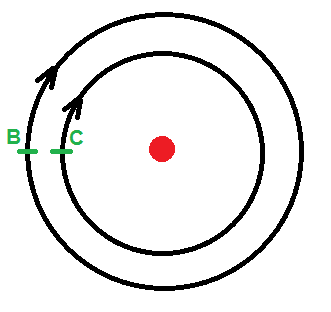
Motor B is moving faster than Motor C.
2. Pivot Turn
When the motor driving the inside wheel stops, the robot turns by rotating only the outside wheel.
The robot moves along a circular path with a fixed radius. The radius of this circle is equal to the distance between the robot’s wheels, shown in blue in the image below.
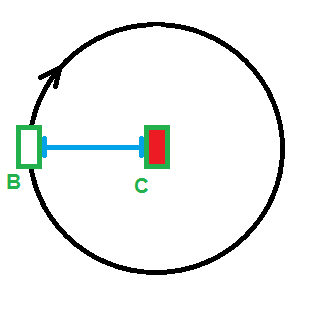
Motor C is stopped while Motor B drives the outside wheel.
3. Spin Turn
A spin turn occurs when the robot rotates in place by driving both wheels in opposite directions. In this case, one motor moves forward while the other moves backward.
During a spin turn, the robot rotates around its center. The diameter of the circle traced by the wheels is equal to the distance between them. This type of turn is useful when there is very little space available for maneuvering, such as inside a tunnel or a narrow corridor.

Motor B and Motor C are driving, causing the wheels to rotate in opposite directions.
Courses and lessons with this Tutorial
This Tutorial is used in the following courses and lessons

Robotics with LEGO - Level 1.0 - Adventure in Space
The first level of the Robotics with LEGO curriculum for students in fifth to twelfth grades.
Various constructions with robots are built. Learn how to control the motors so that the robot navigates around the Moon and Earth in various ways. Getting to know the first two sensors. The robot can feel its surroundings with the help of the Touch sensor and avoid obstacles.
The Ultrasonic distance sensor can help the robot avoid obstacles. Students work with concepts like loop, degrees and medium motor. Robots can now do two different actions at the same time - while solving missions on a field, the third motor clears detected obstacles.
- 126
- 123:52
- 150
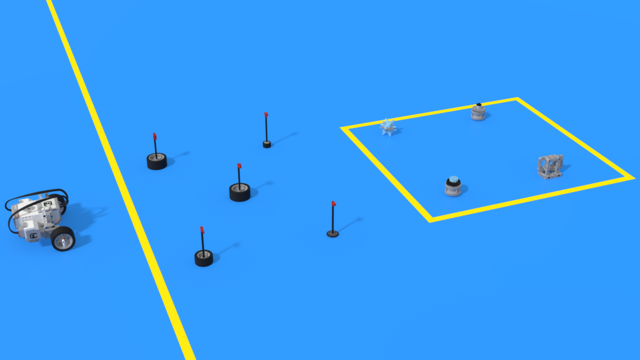
Lesson 3 - Clearing the landing zone
Intro
Today we are building a robot, what would automatically clear the landing site.
Before a space craft lands on the moon, you send a robot to clear the landing site. Your robot has landed on the Moon and its task is to clear the site and to prepare it for the landing of the bigger space ship.
The robot lands slightly further away from the site and it must find its way to it. Regretably it road is blocked by rocks that can not be moved. The robot must go around them.

- 9
- 4
- 2
- 3d_rotation 0

Level A2. "Space exploration". Robotics with LEGO
The second level of the Robotics with LEGO curriculum for students in second, third or fourth grades.
A new sensor is introduced - the Ultrasonic distance sensor can help the robot avoid obstacles. Students work with new concepts like loop, degrees and medium motor. Robots can now do two different actions at the same time - while solving missions on a field, the third motor clears detected obstacles. The first robot with chain-treads is built.
- 63
- 3:02
- 117
Lesson 3 - Free building
Intro
Today we are building a robot, what would automatically clear the landing site.
Before a space craft lands on the moon, you send a robot to clear the landing site. Your robot has landed on the Moon and its task is to clear the site and to prepare it for the landing of the bigger space ship.
The robot lands slightly further away from the site and it must find its way to it. Regretably it road is blocked by rocks that can not be moved. The robot must go around them.
- 3
- 3
- 2
- 3d_rotation 0

Level Y. The Younglings (Pre-release)
The absolute starter. A new course book for students that are first grade (7-8 year old). If a student is to young to join the 8-10 years curriculum this is the place where he/she should start.
The course book contains a number of well structured 2-hourse classes for the youngest students that we've ever managed to productively include in a LEGO Mindstorms EV3 Robotics courses, groups and classes.
(Course book available only in Bulgarian and will soon be translated)
- 14
- 2:49
- 102
Python with LEGO Mindstorms EV3 - Level 1
The course introduces students to the programming language Python. We use LEGO Mindstorms EV3 Robots. Python is a popular programming language. It could be used for introducing students to programming, for academic studies, for developing machine learning algorithms and as a general-purpose language.
During the course, students learn how to read and how to develop Python programs. They use an Integrated Development Environment called Visual Studio Code. Robots are programmed to perform interesting and funny tasks like "bringing you water". The level ends with competition on a playing field with boxes.
- 74
- 28:18
- 114

Lesson 7 - Warehouse Robot
For students who are not continuing directly to the next level, today is their final lesson.
- 6
- 3
- 8
- 3d_rotation 2
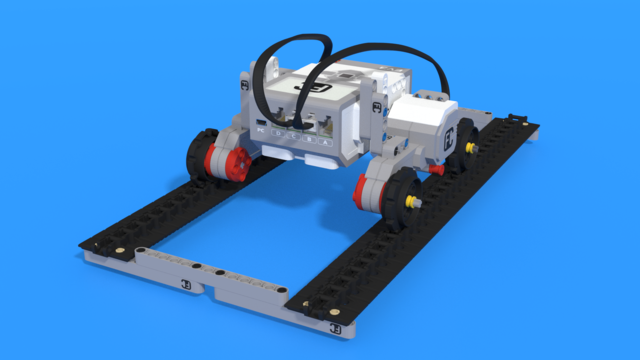
Python with LEGO Mindstorms EV3 - Level 2
In the second level of Python for EV3 robots, students learn in-depth the touch sensor. The sensor is used as an input device for manual control of machines, as well as a sensor for autonomous robots. In a pair of lessons, students build a control panel for the grabber and the movement of a crane. Programming wise, students learn how to fork code with "if-else" constructions, how to create conditional and forever loops with "while" and how to negate conditions with "not" operator. In the end of the lesson, robots can detect obstacles and avoid them, so that they traverse a simple labyrinth.
- 39
- 19:58
- 93

Lesson 6 - Automated vacuum cleaner
Introduction
Today we will create a robot that will behave like an automated vacuum cleaner!
One of the most annoying household chores an adult could have is cleaning their home. Which is why engineers invented the Roomba! And we're not talking about the dance, but rather a robotized home vacuum cleaner.

- 5
- 4
- 8
- 3d_rotation 1
Level A1 - Space Adventure - Robotics with LEGO SPIKE Prime
This is the first level of the LEGO Robotics Curriculum for second-, third-, and fourth-grade students.
A "space adventure" but with robots. Different robot structures are built in Level A1. The motors are controlled so that the robots perform precise movements around the "Earth", "Moon" and "Sun". We use the force sensor to overcome various obstacles we bump into. We learn interesting facts about the solar system and space vehicles.
- 65
- 30:30
- 76

Lesson 3 - Satellite
Introduction
In today's lesson, we will create a small robot that demonstrates the process of making circular turns, known as arc turns. The lesson will focus on satellites and their practical applications in our daily lives.

A satellite refers to a companion or an object that moves alongside another. Earth's natural satellite is the Moon, while artificial satellites are small spacecraft launched into Earth's orbit with the assistance of rockets.
An orbit represents the imaginary path that a satellite follows as it revolves around the Earth. Today, we will program our robots to move in circular orbits. Additionally, it's worth noting that some orbits resemble an ellipse and are referred to as elliptical orbits.
- 6
- 4
- 11
- 3d_rotation 1
Level A: Python Foundations – Robotics with LEGO SPIKE Prime
This is the first level of the LEGO Robotics Curriculum with Python, designed for students in grades 2, 3, and 4.
In this robot adventure, students learn to control robots using real Python code, while teachers guide them through their first steps in text-based programming. Throughout the level, students build a variety of LEGO SPIKE Prime robot models and program them to move, turn, and complete tasks with increasing precision.
Step by step, students learn how to read, understand, and write their own Python programs. Through fun and creative challenges, they bring their robots to life and discover how code can control movement, solve problems, and interact with the world. Along the way, they explore concepts such as navigation, obstacle avoidance, and sensor-based behavior.
The curriculum is designed to help teachers introduce programming in an engaging and approachable way while giving students plenty of opportunities to experiment, test ideas, and develop confidence in their coding skills.
By the end of the level, students apply everything they have learned in an exciting robotics competition. Using their own programs and robot designs, they complete missions on a competition field with boxes, putting their coding, engineering, and problem-solving skills to the test.
- 46
- 4:32
- 78
Lesson 7 - Warehouse Robot
For students who are not continuing directly to the next level, today is their final lesson.
- 4
- 3
- 11
- 3d_rotation 2