
Task: Connect motors to the brick with cables
We will demonstrate how to connect the brick and the motors by using cables correctly and reliably.
- #363
- 04 Feb 2017
We will demonstrate how to connect the brick and the motors by using cables correctly and reliably.


In this video we discuss part of the pinless attachments build by the ELM team. Without pinless attachment it is nearly impossible to achieve a good score at the FIRST LEGO League competition.

In this series we will do a short demonstration on the FIRST LEGO League Trash Trek 2015 solutions by one of the teams. These are example solutions with good tips and tricks along with some interesting strategies and videos directly from the team

We discuss the state of "Lost" and the different ways we could escape this state. We also build the next step of our State machine programming pattern where the next state is determined by the previous state.

You think that you can quickly change the attachments of your LEGO Mindstorms EV3 competition robot? Are you sure? In this first episode of the series you will see how to create and attach attachments without using pins and how faster and easier this could be. You will see the design logic of a few attachments and how they work on the field.

Experiment with changing the orientation and direction of gear wheels. Here are part of the tasks that you should complete before moving forward with the course.

Display a matrix with "life" and "dead" cells on the EV3 LEGO Mindstorms brick screen. The program is available. You can see it, change it, modify it and learn from it.


You can position the motors on the construction in a number of different ways. We are exploring the advantages and disadvantages of each of them. These are building instructions for the first way to position the LEGO Mindstorms EV3 motors.

Building instructions for a LEGO Mindstorms EV3 Active attachment for changing gear orientations

Building instructions for Module 1 of the Modular EV3 LEGO Mindstorms vehicle - the Trunk.
The goal of this robot is to teach students how to build modular robots. This first part is just one of the modules.

Building instructions for module 3 of the Ugbroid - the drive mechanism.


EV3-G program for precise motor control of the LEGO Mindstorms EV3 robots

A LEGO door with a touch sensor that knows when it's open. It has a stopper and even makes the familiar noise of a creaky door. You can use it by its own or put it in a model of a house.

Sebastian is a six-legged creature, which technically makes it not-a-crab. Anyway, it still walks sideways and is amazing to build and watch.
You can find the program for Sebastian here.
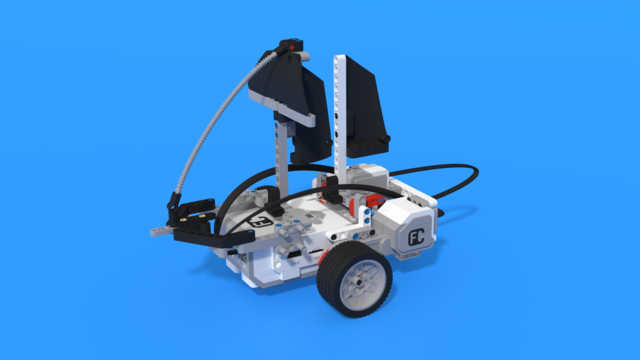
Barco from spanish means boat.
The robot is made to look like a sail ship. The sails are made out of technic panels, attached in various ways to create the best look. Otherwise the robot uses two motors with tyres to move. At the back of the robot there is a Gyro sensor, which helps it maneuver.

This is a LEGO Mindstorms EV3 competition robot used in FIRST LEGO League competitions and used by a team in Brazilian regionals. It followsa Box Robot principle. The robot has passed through the following competitions in Brazil:
Local competition in scholl
Regional: Northeast
National: Rio de Janeiro
International: Uruguay
It is not entirely "clean" as it has parts of it not optimezed as in the other box robots, but it is a nice example and a great work from the FLL team.

This MyBlock is made in substitution for a regular wait-gyro-rate block. It is made with a filter so that big differences in sensor data don't show up as much. It also uses only absolute values of the data so negative or positive angle on the gyro sensor does not matter. The MyBlock ends, when the rate is below a certain value, which is inputed by a parameter.
By default the Gyro sensor is connected on port 2 but if your robot is different, make sure to change the blocks to suit it.
This program demonstrates how to use a tree of switches to recognise a pattern and offers a unique password protection for each one of them vie special MyBlock, that can be copied for every new added user.
The program that Nightbeast team use for their second Run in FLL Into Orbit Challange. In this run they еject the 2x4 Brick by placing a Regolith Core Sample into the 3D Printer, make the Crater Crossing mission and scores a meteoroid (shoot a ball).

Instructions for building a LEGO truck. We use a medium motor for steering and a large motor for driving one of the rear wheels.

A program, that makes the Turtle follow a designated course and get back to it, even if it's been manually rotated. It also hides in its shell when it sees anything close to it.
Careful: Gyro Sensor port in this program is port 3. Check your cables when you run this program.
NOTE: The program contains my blocks, that will appear broken if you use version before 1.3.0 of the EV3 Mindstorms Software