
How to build SUV Box Robot for LEGO Competitions
There are a few main challenges with box robots and in the following tutorial we would like to resolve them. Read on and let's see how we could do this.
- #971
- 19 Aug 2018
There are a few main challenges with box robots and in the following tutorial we would like to resolve them. Read on and let's see how we could do this.
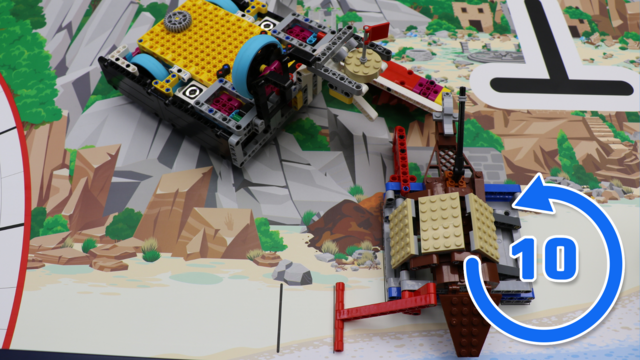

Discover why this solution achieves a perfect 10 out of 10 successful runs in the FIRST LEGO League 2025-2026 UNEARTHED competition. Using the Smaller Pancake box robot together with this passive attachment, we analyze the design choices that make the completion of Mission 15: Site Marking and Mission 12: Salvage Operation remarkably consistent.

It's a box! It's a robot! It's a box robot. Box robots are very popular on different robotics competitions involving LEGO Mindstorms like the FIRST LEGO League or World Robotics Olympiad. Let's start with a brief introduction and continue in the next videos with explanation on the features of the robot and why such robots are frequently used.
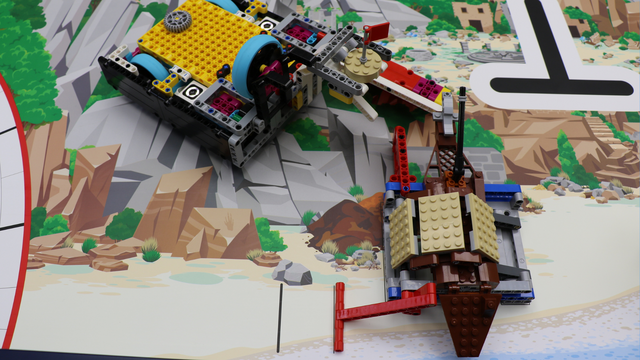
Learn how to complete Mission 15: Site Marking and Mission 12: Salvage Operation in the FIRST LEGO League 2025-2026 UNEARTHED competition using the Smaller Pancake box robot and this passive attachment.

This video tutorial is part of the series on how to make your robot 100% precise and accurate. We accomplish the Emergency Walk mission 10 out of 10 times. The attachment works. Every time the attachment is started in successfully accomplishes the mission and this is one of the most difficult missions on FIRST LEGO League competitions ever.

Here you can find a cheat sheet with the most commonly used commands. There are also more advanced commands that are not included in the built-in API, but the available ones cover most, if not all, of the students’ needs.
Below is an example of a function definition and how to read it:
move_for_degrees(pair: int, degrees: int, steering: int, *, velocity: int = 360, stop: int = motor.BRAKE, acceleration: int = 1000, deceleration: int = 1000) → Awaitable
...
Parameters
pair: int
The motor pair to be used.
degrees: int
The number of degrees the motors should rotate.
steering: int
The steering value (from -100 to 100).
Optional keyword arguments:
velocity: int
The speed of the motor in degrees per second.
...
stop: int
Defines how the motor behaves after it stops. Use constants from the motor module.
...
acceleration: int
The acceleration in degrees per second squared (1–10000).
deceleration: int
The deceleration in degrees per second squared (1–10000).
Let’s take a closer look at the function definition:
The parameters before the "*" symbol are required parameters. You must provide them in the correct order. For example, the first parameter is "pair", so the command expects the motor pair first. The same applies to "degrees" and "steering".
The parameters after the "*" symbol are optional parameters. To change them, you must use their names. This means you cannot just write a number - you need to specify which parameter you are changing. For example:
motor_pair.move_for_degrees(motor_pair.PAIR_1, 360, 0, velocity=280)
Finally, the "Awaitable" keyword means that this command can be used with "await". This allows the program to wait until the command has finished before continuing with the next one. For example:
await motor_pair.move_for_degrees(motor_pair.PAIR_1, 360, 0, velocity=280)

Here is Lintu. It is a marvelous LEGO Mindstorms EV3 Animal robot that looks like Kiwi, the famous New Zealand bird. It is quite rare to see a Kiwi bird in person. But fear not, we've prepare a robot that looks almost exactly like the original.

In this course, you will work with other students in your group. These may be your classmates, teammates, or students you know from other activities. It is important to get to know your group so you can work well together.
Your teacher will introduce themselves first, and then you will get to know the other students in the group.
Remember your teacher’s name and address them by name.
Listen carefully to your classmates and pay attention to what they share. Show the same respect that you would like to receive.
Each student should share:
their name;
their age;
their grade;
the school they attend;
their favorite sport, hobby, or activity.
If your teacher allows it, you can also share a short story or something special you have done - for example, “I’ve done something you may not have done, which is…”.

Here we start with a second box robot that we would like to build. It is in a way improvement to the first robot and we would take a look at its features.

The robot should park in the parking positioned in the north-east corner of the field.

At the end of the match the robot is completely in the parking area in the north-east corner of the field: 50 points.

With the shape of a box it is very easy to align this robot to different wall and to add very stable pinless attachments to it. The goal of the video is to discuss this feature of this particular robot construction.

The EV3 Gyro sensor is quite powerful, but there are some little tricks when using it. In the previous episode we showed a hardware solution to the problem and now we are exploring how could the sensor be calibrated from the EV3-G software. Thanks to Sharon and Faye (full names omitted) for the request for this video.

In this self-paced, beginner-friendly online course, you and your child will learn how to create a rotating LED strip display—a glowing clock that seems to paint time in mid-air. And don’t worry if you’ve never soldered, wired a circuit, or touched an Arduino before. We guide you from the very first step all the way to powering on your finished display.
By the end of this journey, you’ll both have learned real hands-on skills—like how to solder, drill clean mounting holes, read resistor color codes, and work with common electronic components—all while building something that looks impressively “advanced” but is totally achievable for beginners.
Before you jump into the build videos, this first lesson gives you a clear picture of what you're creating—and what materials you’ll need to make it happen. We want you to have full confidence in what you’re investing in. There are no surprise expenses later: everything required is listed upfront, along with tips on where to buy each part.

The second construction of the series along with a comparison with the first construction. The new robot requires more parts, but has a few more advantages.

The hall effect sensor can't detect a magnet, without there being one in the first place. While we can use glue or other ways of attaching a magnet to the clock face, we decided to use a second magnet on the other side of the face to hold the main one attached to it.
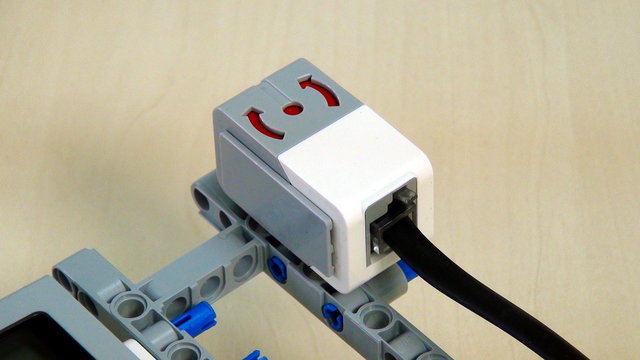
Много отбори имат проблеми с жироскопичния сензора на EV3 и неговите смущения. В това видео показваме един начин за коригиране на поведението и получаването на точно измерване от този сензор.
Make sure the connection between the clock arm and the clock's body is strong. Otherwise, it may sleep when you turn it on.

Five different robot chassis. This is the goal of the series. To present ideas for different design of the robots and especially the robot bases. If the base is stable and balanced, then in could easily be extended. Let's start with the most simple of the five.
The 330 Ω resistor on the LED strip’s data pin acts like a tiny speed bump for the signal. It protects the LEDs by keeping the data signal from being too strong or too fast, which helps the strip work correctly and last longer.

We should how to build a frame that could hold the attachments for specific competition missions. This frame is added in a pinless manner. This means very fast and easy without any glitches of the pins.
The ground connection to the LED strip can be connected to any ground connection of this circuit. There is no danger of anything burning.

In this tutorial we present a way to align your robot to a black line. Go through common difficulties, that the teams face, when they need to align their robot, and provide a solution for them.
Be careful with the power connection of the LED strip. If you connect it to the 9V battery line, it will fry the LED, and the strip will be ruined.
Measuring the center of mass of the arrow arm, in its unfinished form, will be inaccurate, but we can come closer to being accurate if we place as many of the components on it before making our guess.

In this video we discuss how do we transfer power from the motors that are "inside the robot box" to the gear wheels that are "outside the robot box".
