Improving FLL Robot Game. Durability of a LEGO robot construction
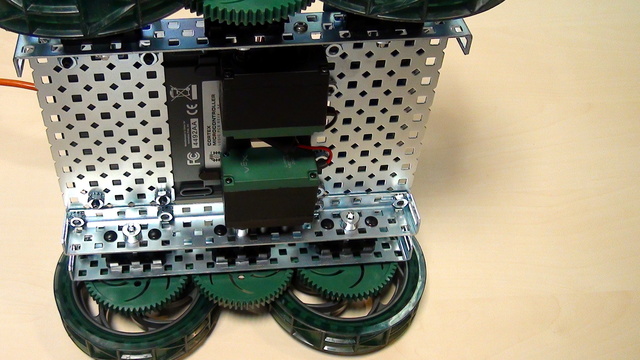
In this video we discuss the durability of the construction of LEGO robots and how do we make them more durable.
- #463
- 02 Apr 2017
In this video we discuss the durability of the construction of LEGO robots and how do we make them more durable.
Safety notice: There is current flowing in this device and you can touch the device with your bear hands. This is not dangerous, but there are a few things that you should consider especially in class.
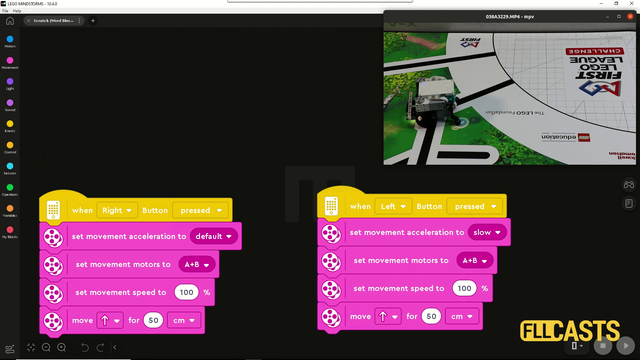
In this video tutorial we are demonstrating the impact of slow and fast acceleration on the robot. In the Scratch program there is an acceleration block for fast and slow acceleration. The robot behaves in different way. Let's explore them so that you know what to use for FIRST LEGO League competitions.
In this video tutorial we accomplish the basketball mission from the FIRST LEGO League 2020 reply competition. We use the LEGO Education SPIKE Prime competition robot called Gazon. You will learn the principles of accomplishing a mission of two parts - put the ball in the basket and lift the basket.
How to control the arm of the push bot using the two triggers on the GamePad of the FTC Push Bot?
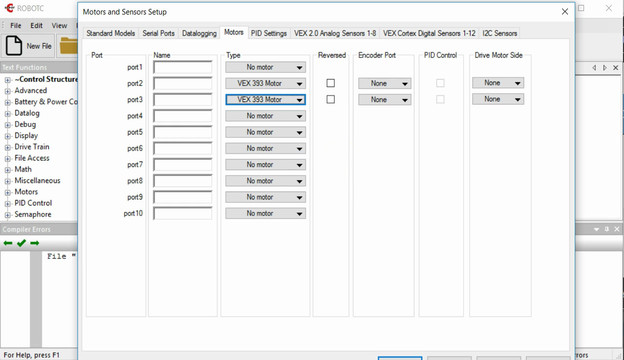
The comunication between the motors and the controller should be configured in the RobotC software. Each motor could be connected on a different port and the goal of the video is to show you how.
The last thing you want to lose during every robotics competition is time for changing the programs on the brick. This could require seconds and as we all know every second counts. There are a few ways to improve the way of choosing programs. In this video lesson we will show you how to program a menu directly in your program.
In this video tutorial we take a next step in programming reliable and consistent robots and this is to learn how to stop at a second intersection. We need this because most of the time when we want to reach a mission model on a robotics competition field, the model will be located away from us and we must use all kind of technique to reach it. In this tutorial - we stop at a second intersection.
This video tutorial is part of the 10 out of 10 series at FLLCasts and we will demonstrate how to accomplish the FIRST LEGO League 2020 RePlay competition mission called Innovation Project. Our goal is to push the construction to the require place on the field. What you will learn with this tutorial is how to place a random construction in the base and push/pull it to a place on the field 10 out of 10 times.
Pivot turns require fractions of rotations, a number between 1 and 2. Sometimes it is more convenient to use degrees.
In the software, you can change the "move block" to use degrees.
In this episode we would modify the blinking diode program so that the diode will stay on for four seconds.
There are basically three type of generations in the robotics game of life.
In this video tutorial, we demonstrate how to release the cargo of a mission model. This mission model is an Airplane. We have to push a lever down to release it. We use an active attachment with a gear wheel.
A common question is how to display arrays on the LEGO Mindstorms EV3 brick screen. Displaying values from an array is not different from any other display operation. In this tutorial, we would look at displaying two specific values. The minimum and the maximum for a specific sensor from the Advance Calibration Course Section
What should you do as a teacher when the students are calculating the gear ratios and number of needed rotations?
Conenct the motors of the VEX EDR motor to the VEX Corted Controller. For connecting we need the motor drivers.
After we've download the software we must install it and most importantly configure it. Without propertly configuring the software it would be difficult to use the Cortex Controller.
Let's look at what game of life actually is, what are the rules and how to play the game on paper
In the first part we built our first 3D LEGO model. Today we will smooth the model we have created and go through the process of creating PDF instructions for building it.
We use a sensor so the robot must be reliable and accurate right? Wrong. The robot is not reliable and accurate only because we use sensors and that's really important during FIRST LEGO League competition. There is a reason for this and in this tutorial we demonstrate and explain how the robot behaves with a basic use of the Motion Sensor to move straight. As a result you will learn why is it important not to stop at this stage and to go to the next level with more advance use of sensors.
One of the smartest things you could do in any software program is to extract logic in small reusable, simple, understandable units. In EV3-G these are called Blocks and we are going to extract the logic for finding a minimum and maximum for each of the sensors in a new block.
We will share the idea behind that challenge and how to conduct the challenge in a classroom.
In this video tutorial the Chain Monster LEGO box robot uses a multi-purpose attachment to collect two elements from the FIRST LEGO League 2022-2023 SUPER POWERED field and these are the "water" units on the field. What's interesting is that the contain where the water units are stored could be closed and opened and this allows us to freely move while non of the water units are lost.
Following the Advanced Sensor Calibration course section, it is time to extract the logic for getting a calibrated value into a new block. This block will have an input and on this input, we give the port number. The block will return the calibrated value for this port number. We've built all the other blocks only because of this almost final video here.
To correctly upload the blinking diode program to the controller we must first check some of the configurations of software. These are the "selected controller" and COM port
This is a 10 out of 10 tutorial demonstrating the consistency and reliability of a LEGO Education SPIKE Prime robot when the robot delivers a mission model to a specific position on the field.
In this video lesson, we will show you how to build a menu as a MyBlock in LEGO Mindstorms NXG-G. Having a menu is a must at robotics competitions since it saves time and gives easy access to program functionalities.