

Robot Design Ideas for Chassis with Mindstorms EV3. Base Chassis 3
The third robot has the brick and motors placed vertically. This is quite unusual and difficult, but the construction is very powerful because it saves space.
- #185
- 07 Feb 2016
The third robot has the brick and motors placed vertically. This is quite unusual and difficult, but the construction is very powerful because it saves space.

You need not confine yourself to the use of drawing tools. You can easily choose an image from the internet, print it out, and stick it to the clock surface. Or maybe you have other ideas of how to customise the clock face?

In this course, you will work with other students in the group. These might be your classmates, teammates, or students you know from other activities. It is important to know your group so that you can work together with them in the best possible way.
We used dental floss to draw lines from the clock face diagonals, and drilled the holes where those lines met.
You need not place the clock's arrow hole in the center. As this is a design choice, you can be creative and place it wherever you wish. You can even customise the shape of the clock face as well, so it is not a plain square like ours.

In this video we look at the way this robot uses the LEGO Mindstorms EV3 motors. How are they attached and the what the rotation of the motor is transferred to the attachments.

Don’t worry about which electrical contact you connect to the positive or negative output terminals of the speed controller. The cables can always be swapped later.

In Episode 58 we introduced you to a LEGO Mindstorms EV3 Modular robot. In this tutorial, we show you how we reached that construction. We start from a construction found on the Internet and take you through the process of examining and improving it, till we reach a more stable and reliable robot.
Do not solder anything to the speed controller.

Second active pinless attachment for the robot construction. It is placed in the top/right corner of the robot and includes an interesting gear system for transferring the power. The attachment is suitable for complete rotations.
You need a very short exposed wire to solder to the DIP switch. Try not to strip too much ot it, as it may come in contact with the other end of the switch, effectively bypassing it.

In this video we are also focusing on lifting a loop as a common mission on robotics competitions like FIRST LEGO League/World Robotics Olympiad. We demonstrated an attachment for lifting a loop. The tutorial uses Luly, a small LEGO Education SPIKE Prime competition robot with 3D building instructions as a robot base.
Be careful not to cut the cable too short, as it is a headache to resolder a new one to the battery holder.

This is a third example for adding an active attachment. This third attachment is now connected to the wheel at the front of the robot. Again, the attachment could be easily extended.
Make sure the components are well held in place before soldering. Some soldering station offers clippers that can hold the DIP switch and the PCB; however, you can use a ductype to achieve the same.
While using cardboard to protect the table from solder may look dangerous, solder cools very fast, and the temperature of the soldering gun is much too low to quickly start a fire. It would take deliberate actions to actually cause safety issues with it.

This tutorial in an animated demonstration of how a LEGO Education SPIKE Prime robot could turn precisely at 90 degrees using the Motion Sensor. The goal of the task is to download the program and rotate at exactly 90 degrees. Because of this precise rotation it is easy to know where your robot is on the field and to program the robot to perform in a reproducible way. To download the program check out the courses in which the tutorial is used.

If you screw the bolts too far into the motor, it may stop working. This won’t be an issue later, but if it causes problems now, place a few nuts on the bolt before using it. This will stop the bolt from going too deep into the motor.
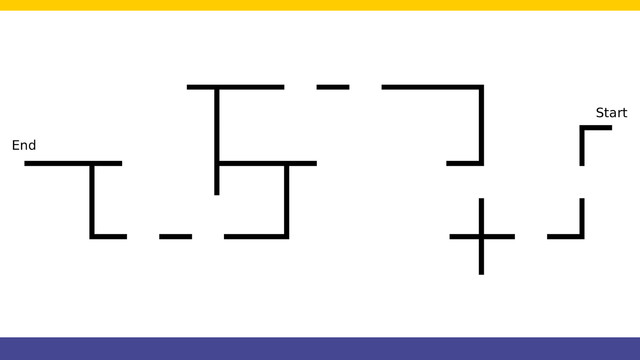
We start a course for following a line with crosses and gaps. This is a challenge that one of the users at FLLCasts.com was trying to accomplish and asked us for advice. We present the whole challenge to you step-by-step. But first, let's also see the whole run of the line following algorithm. With this course, we also do an introduction of using State Machine as a programming pattern.
There is a way of mounting the drill bits faster and more reliably than what is shown in this video; however, it requires a steady hand and starting the drill while the drill bit is not yet mounted. We decided that it may pose danger for people not yet savvy with the drill, and that it is best to show how it was intended to be mounted. We strongly advise not using faster methods before you are very comfortable handling this tool.

In Episode 58 we introduced you to an LEGO Mindstorms EV3 Modular robot. Mic Lowne wrote to us and had that robot remade, because it used too many blue lego pins and could not be build using one EV3 kit.
The dip switch is mounted by using the holes that are already placed on the PCB board. Meaning that we don't need to drill any holes for it.
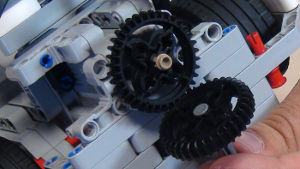
Based on feedback from many of you in this episode I would like to show you how to build an active attachment that changes the orientation of a gear wheel placed vertically to a gear wheel placed horizontally. This attachment could be used in competitions and shows a basic principle of changing the orientation. All attachments could follow the same principle.
time to plan where everything on the PCB will go. You can rearrange the components as you wish, as long as the wire connections are done correctly after that.

The last fifth construction is larger compared to the previous constructions. It is wider. It has four sensors and you can take a larger load all by keeping the robot stable.

If you’ve connected everything correctly, you can now turn on the motor and control its speed using the potentiometer.
The potentiometer is the small knob on the motor speed controller that you can rotate.
Time to make the final connection and complete the prototype.

Need to transfer circular into a linear motion. You need a rack. Here is an attachment with a rack for our box robot.

The attachment builds on previous episodes this time using two LEGO rubber bands. When a lever is released the rubber band exerts pressure on it and moves it in a circular motion. As an example we are solving the 2012 FIRST LEGO League, Senior Solutions, stove mission (which was quite interesting as a mission)