In this video tutorial, we accomplish one of the most interesting missions for me in the FIRST LEGO League 2024-2025 SUBMERGED competition. And it's a very interesting mission model that compared to all the other competitions that we've seen, it's like kind of unique as a challenge. It takes little time to explain how it works here. You can see I'm struggling with directly configuring it. But the point of this mission model is that we have these sections where we have the yellow parts, and the yellow part should be touching the mat. If they are touching the mat or if they are facing downward, we get a point. And we also have these animals in the habitat. So if they are facing up, we get a point. And there are a couple of configurations for this mission model that we can get a different amount of points for. For example, if we just - if we just rotate it and we leave it like this, we get one point for one of the animals.
If we push it, change it a little bit, and we try to position it like this where it faceс upwards, we get two points. Here we get four points. It really is an interesting concept where the mission model is quite complex and you can get different amount of points based on how you orient it. If you put it like this, you get three points. Because there are three animals from the artificial habitat that are facing upwards. Our goal, of course, is to take the most points. So we'll try to accomplish it so that all of the animals are facing upwards.
Move. Engage with the mission model. You can see the robot doing a number of movements. But finally we accomplish it.
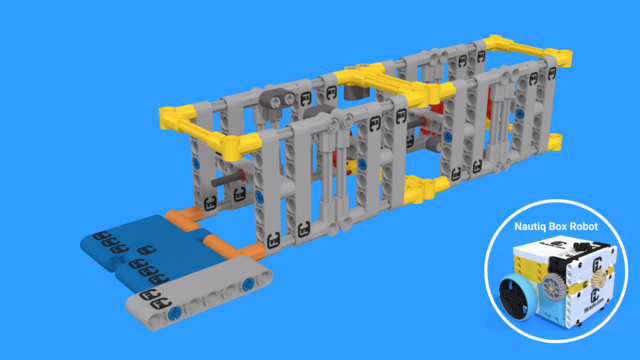
This was a really fast run, and it's worth just doing it slow by hand. The robot moves. Then it uses this small attachment at the front. It's again a small pinless attachment that directly connects with the driving gear wheel. And we can control the attachment. There is a not very complex gear mechanism there that changes the direction of the movement. So we move and then we push.
The attachment is used to push the mission model. And then we also use the same attachment to kind of lift the mission model. We move forward and the mission model will go up.
You saw it when we were doing it fast - like when the robot is running. Now with the hand, it's like a little bit more difficult to show it. But the idea is to push and to lift the mission model.
Then we move back а little bit. As we move back, we again push on the mission model for the two sections to fall on the other side.
If we have enough force, all the sections will fall. But usually we don't have enough force in the robot, so we have to return back. And as we return back, we have to push the final section down. So it's an attachment that could push and could lift at the same time. You see the amount of movements that we have to do, like five or six of them.
It's worth showing the mission from a different point of view. Robot moves, pushes, lifts, final push. All the sections are as they should be for the maximum amount of points. Pretty cool. See you in the next tutorial.