

EV3 Phi. Adjust motor power
How to control the speed of the motors and the speed of the robot.
- #407
- 15 Apr 2017
How to control the speed of the motors and the speed of the robot.

In this episode we combine in a single program the previous two programs for moving forward and backward.

This is the first part of accomplishing M03 Energy Storage with the Kriket Box Robot. In this tutorial we show how to Drop the energy units in the storage. The second part will focus more on how do we pull the element from below the energy storage.

"Sometimes it works, sometimes it does not work" - this is the most common case in FIRST LEGO League competitions. In this tutorial, we demonstrate and discuss such a case where the first part of accomplishing the mission always works but the second part has about 60-70% success rate. The robot is not very consistent. Let's take a moment to see it and explain why so that we can resolve the problem in the next lesson.

In this tutorial we demonstrate how accurate the robot is when we are moving it slow vs when moving it fast. The point of the tutorial is to show that moving slowly is generally much more accurate. It is not accurate enough for a FIRST LEGO League competition, but if you have to move without the use of the sensors you can at least move slow.

In this video tutorial we demonstrate a few ways to use the Distance sensor from the LEGO Mindstorms Robot Inventor on FIRST LEGO League competitions. We don't enter into the details about programming as we do in the LEGO Mindstorms Robot Inventor Programming course, because here we demonstrate the behavior of the robot when the sensor is use and we make the argument that you should always use sensors at FIRST LEGO League competitions

In this video tutorial we demonstrate the behavior of a LEGO Mindstorms Robot Inventor robot when we use the Motion sensor. The Motion sensor was also referred to as Gyro sensor in previous versions of the LEGO Mindstorms Robot. We do not enter into the details of the programming and you can download the programs from the course lesson, but we make a demonstration of how the robot turns to about 95 degrees when we try to turn it to 90 degrees, we explain why and we suggest a way to improve the behavior of the robot.

We are about to connect the whole car with the lights and motors to the controller. Let's recap to know what is ahead of us, what would the process be and what is the end result of the next couple of sections when at the end we have a car controlled by the phone

The scorpion is one of the most famous robots build with the NXT kit. In this lesson we are showing how to use the rotation sensor to program the scorpion and its strikes. The main challenge is how to return the spike for the same amount of degrees after it strikes. The other topic is how to use variable to keep the state of the scorpion. Both of this techniques are very valuable during the competition.

In this 10 out of 10 tutorials we do 10 runs that demonstrated how consistent and reliable it is to stop at the second intersection. This is useful as it is one of the main ways to figure out how to position yourself on the field.

When aligning backward the robot is still very consistent. It does not matter the direction in which we align. What you will learn from this tutorial is what is the consistency and reliability of the robot that you could expect.

In this video tutorial we follow a line 10 consecutive times. In this way we demonstrate whats the consistency that you could expect from the robot when following a line with a multi-states algorithm.

In this video tutorial we demonstrate the user of a quick 'pinless' attachment. As all pinless attachment it is not that they are completely pinless, but that they do not require the "click" of the pins that is often difficult to achieve in a quick pace environment as during FIRST LEGO League competition rounds.

In the course, we are going to use the following components and hardware elements. It is important to know their names and what are they used for.

We are ready to build the first program for moving the robot forward and backward. We learn how to build simple programs for moving the program. But it is not that easy...downloading to the robot does not always result in the robot moving.

In this video tutorial we demonstrate how to accomplish M03, M04, M14, and M15 of the FIRST LEGO League 2023-2024 MASTERPIECE Challenge competition. We use the Chain Monster which is a LEGO Education SPIKE Prime robot equipped with two pinless active attachments.
The side attachment uses a gear mechanism to press down a lever and drop the mini figures with loops. It has a more advanced construction with a special lock to prevent the attachment from rotating when mounting it on the robot. Pay attention that the lock should be removed before the start of the run.
We use a special construction to help us align the robot in the base to ensure the robot starts from the same place every time.

Without the use of the sensors, make sure that you are at least using "set movement acceleration to slow". In this tutorial we will demonstrate why and how this helps us improve the accuracy and consistency of the robot.

Why we change the robots all the time and what to observe in each new robot.
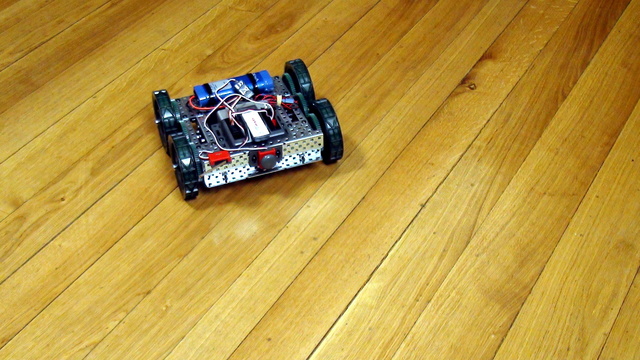
To prepare the robot to move in a square and to use a loop in the program we would first make this VEX EDR robot move forward and turn, using a program developed with RobotC.

To control the VEX Cortex controller we must use a software. In this episode we would download the software from the VEX site. Strange thing is that you must select your region correctly even if you are not in this region

In this video tutorial, we demonstrate a reusable attachment. It is the same attachment we've previously used for two other missions. Sometimes we can build such attachments - one attachment that can complete several missions. Yes, the mission is similar - it is Load Cargo, but we are loading the cargo in different places on the field, and that's important.

We would start connecting a lot of things to the Raspberry Pi. It will be good if we could have some way of referring to the pins on the Raspberry Pi. For example like Pin 5 or Pin 26. Luckily there is such a way.

Как да поддържаме дисциплина в клас и как да ободряваме учениците.

Spinning with the VEX EDR robot involves the use of both motors. The left and the right. Every robot with wheels could spin and this makes not exceptions.

In this video tutorial, we focus on accomplishing M04, M14, and M15 of the FIRST LEGO League 2023-2024 MASTERPIECE Challenge competition. We use the MiniBox, a LEGO Education SPIKE Prime box robot equipped with several attachments. The goal of the robot is to deliver the LEGO mini figures to their designated place and then press down the M03 platform to trigger the immersive experience for the viewer in the mission model.

In this part 2 of the LEGO video tutorial we accomplish the pull part of the M03 Energy storage from FIRST LEGO League 2022-2023 SUPER POWERED. Part 1 was about precise dropping, part 2 is about pulling as the model requires it

This is an animation of a quick pinless attachment that is placed below the robot and is used to deliver parts, like the Container Mission model, to different parts of the field. In the live video in the lesson we explain more about the principles, while here in the animation you can get a quick overview of how it works and you can try to follow the same principles for an exercise.